
Last updated on
Oct 31, 2026
PA Childrens Hospital of Philadelphia Patient Services Intake Form 2013-2026 free printable temp...
pdfFiller is not affiliated with any government organization

Fill out
Complete the form online in a simple drag-and-drop editor.

eSign
Add your legally binding signature or send the form for signing.

Share
Share the form via a link, letting anyone fill it out from any device.

Export
Download, print, email, or move the form to your cloud storage.
Why pdfFiller is the best tool for your documents and forms


End-to-end document management
From editing and signing to collaboration and tracking, pdfFiller has everything you need to get your documents done quickly and efficiently.
Accessible from anywhere
pdfFiller is fully cloud-based. This means you can edit, sign, and share documents from anywhere using your computer, smartphone, or tablet.
Secure and compliant
pdfFiller lets you securely manage documents following global laws like ESIGN, CCPA, and GDPR. It's also HIPAA and SOC 2 compliant.
What is PA Childrens Hospital of Philadelphia Patient Services Intake Form
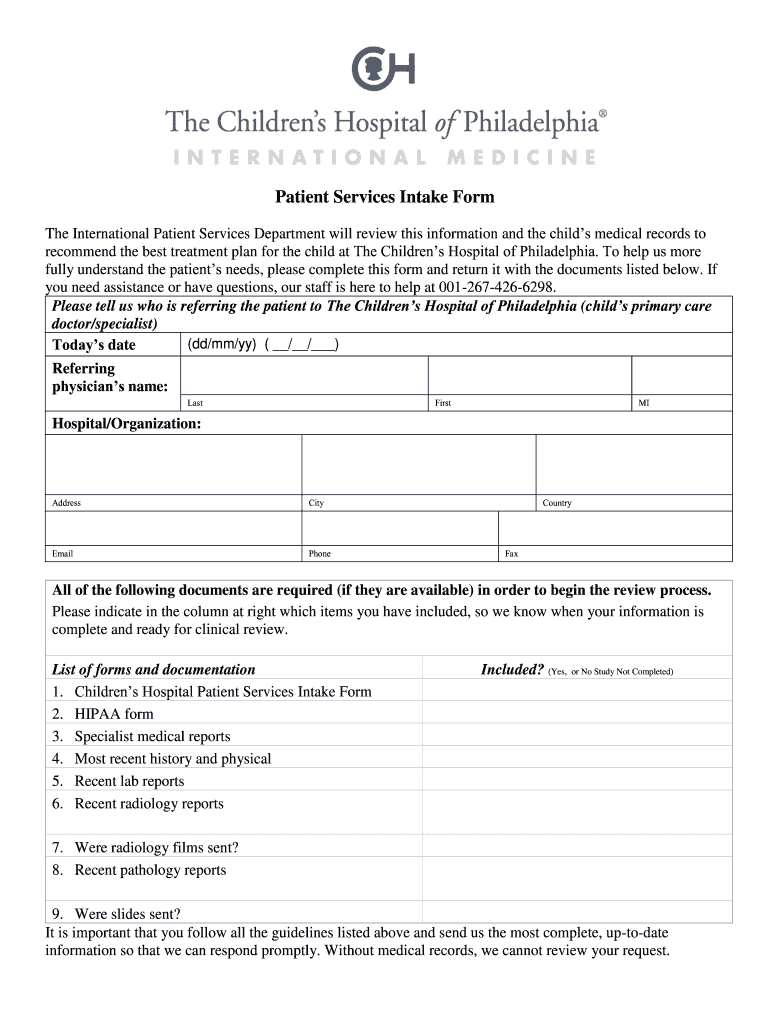
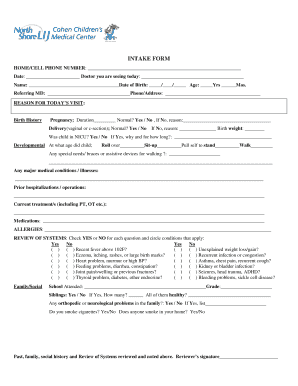
The Patient Services Intake Form is a new patient registration document used by The Children’s Hospital of Philadelphia to collect essential medical history and personal information about child patients.
pdfFiller scores top ratings on review platforms




Much more powerful than any other pdf editor I've seen or used.
Thus far your services has been outstanding
Who needs PA Childrens Hospital of Philadelphia Patient Services Intake Form?
Explore how professionals across industries use pdfFiller.

PA Childrens Hospital of Philadelphia Patient Services Intake Form is needed by:
-
Parents or guardians of child patients seeking medical care
-
Referring physicians requiring patient entry data
-
Administrative staff at The Children’s Hospital of Philadelphia
-
International families needing medical services
-
Healthcare professionals managing patient records
Comprehensive Guide to PA Childrens Hospital of Philadelphia Patient Services Intake Form
What is the Patient Services Intake Form?
The Patient Services Intake Form is a crucial document used to collect essential information from new child patients during the registration process at healthcare facilities like The Children’s Hospital of Philadelphia. This form ensures that healthcare providers gather pertinent details about both the patient and their guardians, streamlining the intake process.
Incorporating vital data such as patient demographics and guardians’ contact information, the form serves as the first step in establishing a comprehensive medical history, which is fundamental for effective treatment planning.
Purpose and Benefits of the Patient Services Intake Form
The Patient Services Intake Form is essential not only for the families completing it but also for healthcare facilities. Accurate medical history collected through this form plays a significant role in creating individualized treatment plans tailored to each child's needs.
Additionally, this form enhances communication between families and healthcare providers, ensuring everyone involved is aware of the child's medical background. Thus, it supports more coordinated and efficient healthcare delivery.
Who Needs the Patient Services Intake Form?
New patients and their guardians are the primary audiences for the Patient Services Intake Form. Specifically, parents or guardians of children seeking medical services need to fill out this form to initiate the registration process.
International families may also require additional considerations while completing this form, as they may have different healthcare experiences or needs that need to be addressed during their intake.
Key Sections of the Patient Services Intake Form
The Patient Services Intake Form comprises several key sections that serve distinct purposes:
-
Patient information, including name, birth date, and medical history.
-
Details about the referring physician, ensuring a continuity of care.
-
Payment information necessary for billing purposes.
-
Information regarding how families learned about the hospital.
Completing these sections accurately is vital to ensure a smooth intake process and effective follow-up care.
How to Fill Out the Patient Services Intake Form Online
Completing the Patient Services Intake Form online using pdfFiller is straightforward. Here’s a step-by-step guide:
-
Access the form via the pdfFiller platform.
-
Start by entering today’s date.
-
Fill out the patient’s name, including last name, first name, and middle initials.
-
Input the referring physician's name.
-
Provide required medical history details.
-
Complete guardian's information, including contact details.
-
Review all entered information before submission.
Utilizing these steps can help ensure all necessary fields are accurately completed, minimizing the chances of errors.
Common Mistakes and How to Avoid Them
While filling out the Patient Services Intake Form, users may encounter several common mistakes, such as:
-
Omitting mandatory sections of the form.
-
Providing inaccurate medical history information.
To avoid these errors, it is advisable to review the completed form thoroughly before submission. This validation checklist can help catch potential mistakes and ensure all information is accurate and complete.
Submission Methods for the Patient Services Intake Form
Once completed, the Patient Services Intake Form can be submitted through several methods:
-
Online submission via the pdfFiller platform.
-
Email submission directly to the hospital’s intake department.
-
Physical mail to the designated address provided by the hospital.
When submitting the form, ensure that the method chosen is secure and timely to facilitate prompt processing.
Security and Compliance When Using the Patient Services Intake Form
Security and compliance are paramount when handling sensitive information such as medical records. pdfFiller employs robust security measures including HIPAA compliance and 256-bit encryption to safeguard personal data.
Understanding these protections offers reassurance to families regarding the confidentiality of their information, ensuring that sensitive medical details remain private.
What Happens After You Submit the Patient Services Intake Form?
After submitting the Patient Services Intake Form, the hospital will engage in a review process. Families can expect to receive feedback based on the information provided.
For those wanting to check the status of their application or clarify questions, reaching out to the hospital's intake team is encouraged to stay informed throughout the process.
Experience the Ease of Filling Out the Patient Services Intake Form
Utilizing pdfFiller for the Patient Services Intake Form enhances the experience for families. This platform offers features such as easy editing, filling, and electronic signing, making the process efficient and user-friendly.
Families can benefit from a seamless online experience, permitting them to focus on their child's health rather than paperwork.
How to fill out the PA Childrens Hospital of Philadelphia Patient Services Intake Form
-
1.Access the Patient Services Intake Form by navigating to pdfFiller and searching for the form title.
-
2.Once the form appears, click to open it in the fillable PDF editor provided by pdfFiller.
-
3.Before starting to fill in the form, gather necessary information including patient details, referral sources, and payment information.
-
4.Begin completing each field by clicking on the blank spaces or checkboxes in the form. Use the typing or selection tools provided.
-
5.Refer to any instructions on the form for details, such as the format for dates and any required signatures.
-
6.After filling in various sections like patient information, parent/guardian details, and medical history, review the entered data for accuracy.
-
7.Ensure you have completed all mandatory fields and double-check for spelling mistakes or missing information.
-
8.Save your progress regularly by clicking on the save icon or option within pdfFiller to avoid losing any data.
-
9.When you are satisfied with the completed form, download it for your records or submit it through the submission method indicated in the PDF.
-
10.To submit, look for the submit button on pdfFiller, or check the form requirements for where to send the completed document.

Who is eligible to fill out the Patient Services Intake Form?
The Patient Services Intake Form can be filled out by parents or guardians of children who are becoming new patients at The Children’s Hospital of Philadelphia, or by authorized representatives.
Are there any deadlines for submitting the intake form?
It is important to submit the Patient Services Intake Form prior to the scheduled appointment to ensure timely processing of the patient's information and to avoid any delays in treatment.
What methods can be used to submit the form?
The completed Patient Services Intake Form can be submitted electronically via pdfFiller, downloaded and emailed to the hospital, or printed and handed in directly at the hospital's administrative office.
What supporting documents need to be submitted with the form?
Along with the Patient Services Intake Form, you may need to provide required medical records, identification documents, and any insurance details to facilitate the registration process.
What are common mistakes to avoid while filling out the form?
Common mistakes include leaving mandatory fields blank, incorrect formatting in date entries, misspelled names, and failing to sign the form where necessary.
How long does it take to process the intake form?
Processing times for the Patient Services Intake Form may vary, but generally, it is processed within a few days, allowing for timely scheduling of the patient's treatment.
Is notarization required for this intake form?
No, the Patient Services Intake Form does not require notarization. Simply fill it out completely and submit it as specified in the instructions.
Related Content
Related Forms






Related Catalogs
Get the latest insights from our blog


If you believe that this page should be taken down, please follow our DMCA take down process
here
.
This form may include fields for payment information. Data entered in these fields is not covered by PCI DSS compliance.